
Linking Channel Integration and System Integration
This guide covers how to combine a System Integration and a Channel Integration in a single application, and how to link a channel configuration back to the System Integration's Permanent Token so both integrations operate on the same account.
This guide assumes you have knowledge of both Channel Integrations and System Integrations in Linnworks. It's worth familiarising yourself with the authorization processes of both application types. Please read the following guides before continuing:
How Linking Works
The two modules are joined by carrying one identifier from the System Integration side across to the Channel Integration side:
- The customer installs the application. The System Integration module issues a Permanent Token, delivered via the Postback URL.
- The developer exchanges the Permanent Token using AuthorizeByApplication. The response includes a session Token and a
sid_registration. - The developer stores the Permanent Token together with the
sid_registration. - The customer configures the channel in Linnworks. Linnworks calls the developer's AddNewUser endpoint, passing the
sid_registrationasLinnworksUniqueIdentifier. - The developer matches the incoming
LinnworksUniqueIdentifieragainst the storedsid_registration, joining the new channel configuration to the existing Permanent Token.
Configuring the Application Manifest
The application manifest must contain both modules:
- A Channel Integration module, which receives the calls Linnworks makes during channel setup and operation. Refer to the Channel Integration Overview for more information.
- An External Application module, which provides the System Integration capability. This is pre-populated for a System Integration app type and is covered in the Application Manifest section of the System Integration Setup Guide.
When creating the application for the first time, choose the Channel Integration application type. The application will then be displayed as Channel Integration on our application store (if the app is made public).
Once the application is created, in the App Modules tab you should see the Channel Integration module already populated. Now create a new module, and choose the type "External Application". It should look like the image below:
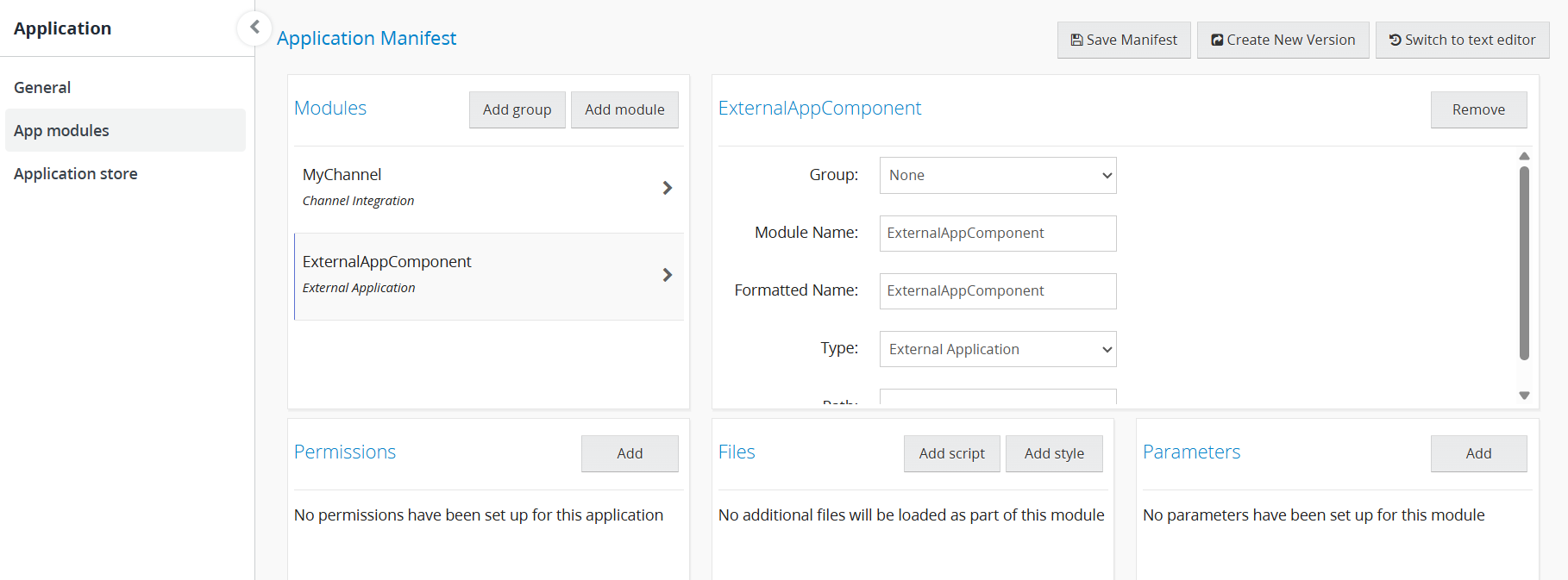
Saving the manifest and creating a new version works the same way regardless of how many modules it contains, see Saving the Manifest for more details.
Installing the System Integration and Retrieving the Permanent Token
Install the application as normal and capture the Permanent Token via the Postback URL.
Obtaining the sid_registration
Use the AuthorizeByApplication endpoint with the Permanent Token, as described in Authorizing API Calls.
Endpoint: POST https://api.linnworks.net/api/Auth/AuthorizeByApplication
| Parameter | Type | Description |
|---|---|---|
ApplicationId | UUID | Your Application ID from the developer portal. |
ApplicationSecret | UUID | Your Application Secret from the developer portal. |
Token | UUID | The Permanent Token received on installation. |
In addition to the session Token, the response also includes a sid_registration value. Unlike the session token, sid_registration does not expire and stays constant for the installation, it identifies the customer account rather than a single session.
Save the sid_registration alongside the Permanent Token. You will need it to recognise this account when the channel is configured.
Passing the sid_registration During Channel Setup
When the customer configures the channel in Linnworks.net, Linnworks calls your AddNewUser endpoint to register the new channel account. The stored sid_registration is supplied as LinnworksUniqueIdentifier.
| Parameter | Type | Description |
|---|---|---|
LinnworksUniqueIdentifier | UUID | Unique identifier of the Linnworks customer's account. Will never change. This is the sid_registration value. |
Email | String | The customer's email address. May be updated over time. |
AccountName | String | Account name being integrated. Will never change — check for duplicates on integration. |
Linking the Channel Configuration to the Permanent Token
On receiving AddNewUser, match the incoming LinnworksUniqueIdentifier against your stored sid_registration values. A match joins the new channel AuthorizationToken to the existing Permanent Token for that customer.
With both identifiers linked, you can now:
- Serve channel calls for that integration configuration, keyed by its
AuthorizationToken. - Re-authorize the stored Permanent Token via
AuthorizeByApplicationto make outbound Linnworks API calls for the same account.
Next Steps:
This guide covers only the linking mechanism between the two modules. You must now implement the Channel Integration functionality found here: https://apidocs.linnworks.net/docs/channel-integration
Updated 3 months ago